Tuesday, May 1, 2012

More Neo Geo Favorites


Last year, I compiled a list of my Top 10 Neo Geo games. Since obtaining a 4-slot MVS cabinet, my fondness for the Neo Geo platform as a whole has grown leaps and bounds. While I'm sticking to my top 10 list, I thought I should mention some of the other games I find myself playing and enjoying. Here they are, in alphabetical order:

Blue's Journey


This action platformer is SNK's attempt to ride the coattails of Nintendo's Super Mario Bros. franchise. While a far cry from Mario, Blue's Journey is cutesy, colorful, often (unintentionally) hilarious, and even has an environmentalist story line. One game feature that Blue beat Mario to by almost two decades is 2-player co-op play, a la Mario Wii. Very fun for kids or the casual gamer.

Captain Tomaday


I honestly cannot think of a more bizarre shmup than Captain Tomaday. The hero is a mutant tomato that flies around and punches other vegetables, and sometimes babies. He eats pills that mutate him into all sorts of things. Weird and funny, this one is worth at least a casual play.

The Last Blade 2


Never has there been a more beautiful 2D fighter than The Last Blade 2. This is a weapon-based fighter in the vein of Samurai Shodown, but with a completely different fighting system. The backgrounds and sprites are magnificently hand drawn. There is a stage consisting of  a dojo that is on fire. I can just sit and stare, not even playing, admiring the heat rippling over the burning wood. It's really something. The finishing moves, which I have yet to master, are brutal and creative. If you like fighters, you need to play this one.

Magician Lord


Magician Lord was one of the launch titles for the Neo Geo in 1990. It's similar to Sega's Altered Beast, except it doesn't suck. A fantasy action platformer that satisfies, this one holds up relatively well for its age.

Metal Slug X


My 2nd favorite Metal Slug game behind MS3. This is a "corrected" version of Metal Slug 2, which suffers from a programming error that makes the game lag horribly. That's a shame, because 2 is a nice game. X takes 2, corrects the lag, changes enemies and backgrounds, and adds some new weapons. The result makes for one of the crown jewels in the Neo Geo library. It's as good a 2D run 'n gun than you'll find just about anywhere. Addictive and creative game play, beautiful sprites, and some serious difficulty make this one a must-have.


Puzzled


This is a Tetris clone that changes game play just enough for SNK to not get sued. In each level, you need to clear lines in order to free a balloon character. It is a fun game. The Japanese name for the game is Joy Joy Kid, which is pretty funny.

Samurai Shodown V Special


The final official game in the Neo Geo MVS library. It's an updated version of Samurai Shodown V, where you can play as the boss characters as well. A beautiful and compelling fighter, it's arguably the best game in the series.

Sengoku 3


On a platform not really known for it's beat 'em ups, Sengoku 3 stands out. I admit I haven't played this one that much, but it's good looking and pretty fun. 

Shock Troopers


A top down run 'n gun that's pretty fun and addictive. Kind of an update to SNK's earlier Guerilla War. One of the gems of the genre. The sequel is good, but suffers from lag.

SNK vs. Capcom: SVC Chaos


This game may have a flawed fighting engine, but the sprites and backgrounds are beautiful. The addition of Capcom characters, which many gamers are familiar with, make this game good to have around for people who aren't familiar with the Neo fighters. A very good casual fighter.

Spin Master


Odd platformer about a boy fighting evil with a yo-yo, among other things. Rescue the kidnapped girl, yada yada. Very campy and cartoonish, but oddly fun.

Top Hunter


A unique beat 'em up with two-plane action, meaning you can kick ass in the foreground, or hit a button and jump to the background to continue kicking ass. Interesting approach to the game clock as well, where you must acquire time-based power-ups to finish a given level.


Thursday, March 22, 2012

SNES and SCART: Reluctant Friends


Recently, I picked up what was basically the last (what I consider) essential system in my retrogaming collection, a Super Nintendo. I used to have one as a kid and was quite fond of it. I have a setup in my game room that consists of, among other things, a smattering of retro consoles attached via SCART to a 32" Sony PVM monitor. SCART delivers pure RGB video signals from consoles like Sega Genesis, Dreamcast, and Playstation, and let me tell you, they look fantastic. The NTSC SNES (v1) supports RGB via SCART as well, but with a caveat: you need to make sure the RGB lines coming out of the multi-out have 330 uF capacitors on them. If they do not, and you try to attach the SNES to a monitor, the picture will be too bright, and the colors will be washed out. I bought a cheap SCART cable from eBay, and sure enough it was wired incorrectly for my monitor. The RGB lines must be capped, and the ground, sync, 5v, and audio must be straight thru. After much soldering and hassle, I hit upon this configuration. You have never seen Super Nintendo until you've seen it in RGB. It's a thing of beauty.

The audio when using SCART is another issue. There is insufficent shielding either in the SNES or the SCART cable for the audio circuitry, which causes some buzzing noise. It is such that the brighter the image onscreen, the louder the buzz. There exist SCART cables with dedicated RCA outs for audio, which minimizes or alleviates the buzz, but those are currently inadequate for my setup. I just keep the volume low and try to ignore the noise.

Tuesday, March 6, 2012

Agetec Dreamcast Stick Full Sanwa Mod


I got the Agetec Arcade Stick for the Sega Dreamcast for Xmas. What a great gift! The stick is built like a tank, and it's meant to mimic a Japanese arcade machine, AKA a candy cab. I no longer had to use the standard Dreamcast controller for 2D-shooters and fighters, which encompass my favorite DC games. The standard controller is ill-equipped for titles like Marvel Vs. Capcom, Street Fighter Alpha 3, Gunbird 2, and Mars Matrix. The Agetec stick is made for those games. But as much as I liked this arcade stick, something was missing. The sticks and buttons felt good, but not great. I read that people were unlocking the full potential of this controller but removing the standard stick and buttons and replacing them with a Sanwa stick and buttons, and replacing the Agetec's 4-way joystick gate with a Sanwa octal gate. Sanwa is the most popular arcade control manufacturer in Japan. They make great looking, durable, reliable, accurate, and comfortable sticks and buttons. I read a couple tutorials about how to do this mod here and here. Looked simple enough, so I placed an order for a white-top Sanwa JLF stick, octal gate, and 6 white 30mm buttons.

I used a Dremel to enlarge the button holes from 28mm to 30mm so that the new buttons would fit. I also removed some of the mounting plastic for the old stick so that the new one would fit, and drilled holes to mount the new stick. I installed the Sanwa buttons and the stick, soldered the wires in place, closed it up, and tested. (All this is covered in the above tutorials.) The buttons all worked right away, but both tutorials had the wrong colors listed for splicing the stick controls. I had to do this manually by testing at the Dreamcast menu screen. After a while I found the right combinations. The correct joystick wire color combinations are as follows:

Agetec          Sanwa
Yellow   >     Black
Orange   >    Yellow
Red        >     Green
Brown    >     Red
Black      >    Orange

The stick is now perfect. The 8-way gate makes fighters feel like they should. The buttons are a bit lighter and more respnsive. Plus, I think it looks pimp in white. If you have the Agetec stick, this mod is highly recommended, especially for shmup and fighter fans. I'd consider it essential.

Wednesday, January 11, 2012

Game Room Update

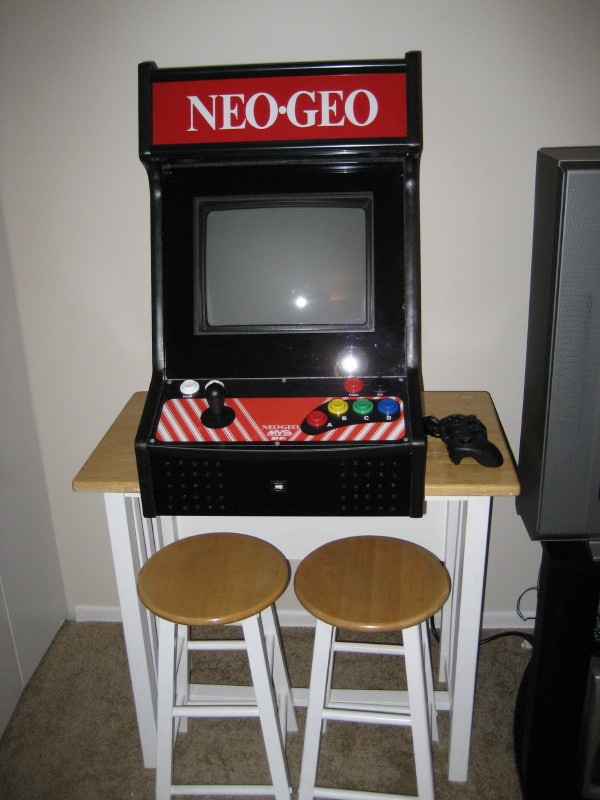
In November, I bought a Neo Geo MVS cabinet from someone off of Craigslist. It was in very good condition, fully functional, except for a half dead power supply. I replaced the PSU and several other cosmetic components. It fit into my apartment with no problem. Here's some before and after pics:


Here's the full list of what I replaced:

Marquee Artwork
Monitor Bezel
Power Supply
Coin door bulb
Sticks + Buttons
Foot
Door locks
Coin reject button

I love this thing. I have 5 games for it now (Metal Slug 1,2,X, Puzzle Bobble, Baseball Stars 2), with 5 more coming (Last Blade 2, Samurai Showdown 2, Blue's Journey, Blazing Star, Neo Turf Masters). I'm beyond happy.

I also added some Ikea shelving to hold all of my controllers. Very nice. Here's a pic of the room as it looks now:


One of my Xmas gifts was the official Dreamcast Arcade Stick, which can be seen on the shelf. It makes playing Dreamcast fighters much more enjoyable than using the stock controller, which I'm not a fan of. I need to get another stick for 2-player fight sessions. Highly recommended. I may swap out its stick and buttons for Sanwa ones, but that's another project.

Tuesday, January 3, 2012

Sony PVM + NES + Comb Filter = Awesome

I recently gave away a Sony 32" TV and swapped in a Sony PVM pro monitor for use with the retro consoles in my game room. This was a good decision. The PVM is an RGB monitor. All my consoles, like my Genesis, PS2, Dreamcast, and Xbox look their best in RGB, and almost every system supports it. Except the NES. The NES only supports composite out (unless you wanna hack the hell out of it for RGB, which I'm not a fan of). The extremely unforgiving composite input on the PVM made my NES games look like ass. I found out that what I needed was a comb filter, something the TV I gave away had, and something my PVM lacks. I found a Kramer FC-10D comb filter on eBay for $14 shipped. This little box has composite in/s-video out and s-video in/composite out. I'm using the former. Man, what a difference in picture quality! The images below tell the story. Super C and Mega Man 2, respectively. Without the Kramer, and with, respectively. If you're using a monitor without a comb filter with your NES, I highly suggest getting one. The Kramer FC-10D is cheap and works great.


Monday, November 21, 2011

Retrobrighting a Dreamcast


ABS plastic was commonly used in the 90's as a cost-effective way to house electronics, like computers and video game consoles. It had one major drawback that was not immediately apparent: it yellowed badly over time and more so in direct sunlight. My Sega Dreamcast that I bought second hand suffered this very affliction. I thought I was just going to have to deal with it until I found out about Retrobright. This a paste that you can make at home out of semi-common products that is supposed to remove the yellow from ABS. I thought it's worth a try, since I'm planning on playing my DC more in the near future. You basically take the highest concentration Peroxide you can find (in my case 12% from Sally Beauty Supply), mix it in a blender with Glycerin gel and Xantham Gum to form a paste. The last setup before application is to mix in a small amount of Oxy laundry powder. Blend it up and put on some rubber gloves to spread it on the plastic in question. Wrap each piece in plastic wrap and put it under a UV lamp (blacklight) for 24 hours, and you'll be amazed at the results. Granted, I did not get perfect results. My DC still had small amounts of faded yellow hues here and there. Overall, however, it looks way better than it did before. Some parts look perfect. The proof is in the pictures (see above). If I had used a higher concentration Peroxide, like 15%, or if I had spread the paste a little thicker, I think it may have worked better. A word of advice: Unless your Retrobrighting 10 devices, do not make the amount listed on the website. Make 1/6 to 1/8 of the amount for a batch capable of coating one device. I'll conclude by saying that if you have a yellowed SNES or Dreamcast, or an old Apple computer, then Retrobright is your friend. I'm very happy with the results.

Friday, November 18, 2011

Review: HTC Rezound (Verizon)


I've had a cell phone since 2003, but didn't own a smartphone until this past Monday. Until that point I had owned only 2 phones, both of which were Verizon LG phones that served me very well. My last phone was an enV2 that I had modded so that I could tether it, wired or wireless via bluetooth, to a laptop and use as a modem. The time spent on the blazingly-slow EVDO-based Internet connection merely counted against my voice minutes. Very handy on vacation. I also loved the full QWERTY keyboard for texting. I basically used the phone until it literally fell apart in my hands. Whatever replaces it, I told myself, had better be an upgrade. Well, the HTC Rezound is just such an upgrade.

I first read about the Rezound (then Vigor) over the summer, I believe. I heard about it having a 720p screen and a 1.5Ghz dual core processor, and said, "That's my next phone." I read all the pre-launch hype, and post-launch reviews, still unwavering in my attraction to this handset, at least on paper. I went to my local Verizon Wireless store at lunch time on launch day, and bought it for $250 ($300 minus $50 loyalty discount). I also bought two years of insurance for $100, which I sort of regret. Total was $365. I had already budgeted for this, so no real issue there. They gave me the "4GB-for-the-price-of-2GB" promo, which is nice, especially since I'm a light data user (more on this later). I walked out of the store a happy guy.

I've been using the phone for 4 days now. The battery life was an issue at first. I was lucky if I could get a day of use on one charge for the first two days, then I wised up. I noticed that the phone has an on/off switch (soft) for 4G and GPS. I turned them off. The real culprit, though, is the Wifi radio. I downloaded a widget that acts as a switch for that as well, and turned it off. Some of you may be thinking, "But don't you want always-on notifications, etc.?" No, I don't. I find them annoying. If I want email, eBay, etc., I'll ask for it. No reason at all to have Wifi running all the time. This is not for all users, I realize. But if you want to get decent battery life out of this phone, or most smartphones for that matter, you'll do as I have. Also, "Task Manager > Kill All" is your battery's friend.

I don't use the phone to listen to music, so no info on Beats Audio, sorry. Unless 64GB microSDHC cards come down in cost, I'll keep using my iPod for music. The phone just won't hold enough music for my liking as is. Anyway, on to the goods. The screen is awesome. I can't really say anything bad about it. 720p. Angry Birds has never looked so good. Videos look amazing. The OS is Gingerbread w/ Sense 3.5 on top. I've customized it significantly, and I like it. Others hate on it. Whatever. I find it to be snappy and responsive. I added the slideIT keyboard so I can swype instead of type. Still getting used to it, but very cool. Haven't used GPS yet as such. I'd like to get a car dash mount first. There is some unremovable crapware like "Let's Golf 2," but that's only a minor annoyance. The phone itself has a beautiful black and red motif with nice rounded corners and a sturdy plastic shell. It's a little heavy (~6 oz.), but not bothersome. Call quality and reliability have been great. Internet browsing is cable modem-fast. People bitch about the volume and power buttons being flush with the unit. I don't really feel it do be an issue. If they were a little more raised, it would be nice, but no biggie.

Overall, I'd say that I made a damn fine choice for my first smartphone. I like just about everything about this phone. Once Ice Cream Sandwich is available for it (Jan.?), it'll be the phone to have. It does everything I want it to do and, once customized, nothing I don't. If you want a fast, beautiful phone, and have some money saved, get a Rezound.

Friday, November 11, 2011

Dreamcast Battery Swap


If you own a Sega Dreamcast, chances are, every time you turn it on, you get prompted to enter the current date/time. This is because your internal battery that powers the chip that stores this data is dead. I grew tired of doing this and decided to do something about it. A Google search for a solution brought me here. I bought a new OEM battery and followed the installation instructions on the site. I learned how to desolder using a "solder-sucker" from one of my co-workers. The whole thing took 10 minutes. I'm very pleased with the outcome. Hopefully I won't have to enter another date for 8-10 years.

Wednesday, November 9, 2011

Game Room Update


I made a few tweaks to the game room that I thought I'd share. I added a Sega Genesis to the mix. I gave away the Sony TV I had because I was never thrilled with its performance. In its place is a Sony PVM-3230 pro monitor. It's a 185lb. beast of a display, and difficult to calibrate, but the picture is damn nice. It's capable of running games at 15KHz low resolution RGB, which is basically the best picture quality for any video game system. I have several of these Sony PVM's in various sizes, and they're the best thing to ever happen to retrogaming. The consoles are attached to the monitor via SCART cables, which is a European standard not available in the US. The SCART cables attach to a special adapter that is used with the Analog RGB input of the monitor. I have SCART cables for the Xbox, Genesis, Dreamcast and PS2. They all look magnificent on this set. The NES runs composite and N64 runs S-Video, both same as before, because RGB is not an option for these. I also got rid of the receiver because the monitor has speaker hookups. The cable box is gone because I didn't ever watch TV in here.

Next post will be about my attempt to Retrobright my Dreamcast to remove the yellow, and to change its battery.


Tuesday, September 6, 2011

My Game Room


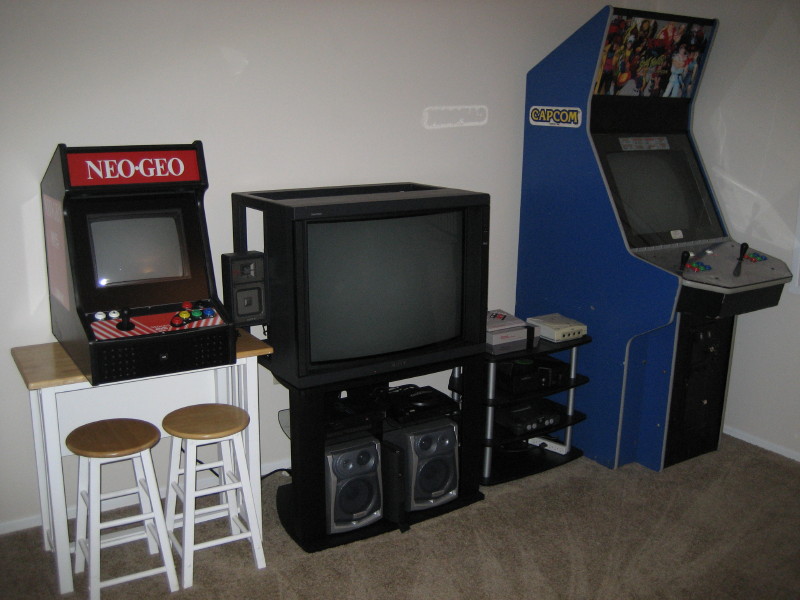
For the first time in my life, I have a room dedicated to gaming. I finished setting it up this weekend. Just enough room for all my gaming hardware. Nothing on the walls yet, but I have plans to hang some arcade cabinet marquees and vintage game ads and posters, once I buy them, of course. My actual game collection is not really that substantial yet, but it's growing all the time. I have about a few dozen games for each system. Quite a few controllers as well. But what I lack in physical games, I make up for in emulation. Mostly due to the Xbox emulators, I have about 10,000 playable games total in this room. Not bad. Many good times will be had in this room.

Game Room Inventory
Neo Geo MVS Bartop (M.A.M.E.)
X-Men Vs. Street Fighter "Big Blue" Cabinet
Sony Wega 32" TV
Yamaha Receiver
Aiwa Speakers
Sega Dreamcast
Sony Playstation 2
Microsoft Xbox (w/ XBMC)
Nintendo NES
Nintendo 64
Motorola Cable Box


Thursday, July 7, 2011

XBMC4XBOX: The Best Media Center


For years now, I've been using XBMC on my Xbox (original, not 360) to listen to music in my living room. I also use it to watch standard definition videos, stream web-based video, and occasionally to look at picture slide shows, not to mention play thousands of emulated video games from over a dozen old-school consoles and arcade titles. I'd say that my Xbox has gotten more use than any other device in my living room.

XBMC over the years has been great, but not without its quirks. Certain things became either wonky or outright broken over time. Playing videos, watching movie trailers, random play for music, all needed work after a while. A few years ago, the developers of XBMC, citing the Xbox's obsolesence, and a need to focus on development for Windows, Mac and Linux platforms, ceased Xbox development. A few Xbox diehard developers decided to carry the torch under the moniker XBMC4XBOX. Up until recently, there hadn't been any major releases of the software. May 2011 brought XBMC4XBOX v3.0.1 stable. Hooray! Utilizing Confluence, the beautiful default skin for the other XBMC platforms, a modern build of XBMC is now optimized for the Xbox hardware, with added features and bugfixes.

Having used it since its release, I can easily say that this is the definitive release of XBMC for the Xbox. It's flawless. The software looks gorgeous. I customized it with black backrounds, giving it a sharp, clean, easy-on-the-eyes look, which I love. All of my former gripes have been addressed. "Party Mode", a.k.a. random, actually plays random tracks from my music library every time, not just one of five or six "random" playlists. Apple Movie Trailers works wonderfully. All of my downloaded video files play flawlessly, regardless of file type. All of the Internet-based TV "channels" of streaming video that I'm interested in, like Revision3, have built-in support.

If you're looking for a way to watch videos and listen to music in your living room/bedroom/game room, especially if you're into retro gaming, then do yourself a favor and pick up and old Xbox from a garage sale or eBay, look up how to "softmod" it (Hint: it's not tough. Youtube is your friend.), and install XBMC4XBOX 3.0.1. You can get a remote for it for cheap as well if you don't like using a controller. I prefer a remote myself, especially since I use a universal remote. It's cheap, does 720p HD over component, supports digital audio, is networkable, runs video game emulators, and it does everything more expensive set-top boxes do and more, except HD video. If you can live without that, get an Xbox. You'll be glad you did.

Wednesday, June 29, 2011

Update to Neo Geo Bartop: Perfection


I'd like to follow up on a project I "finished" last year. Read about it here. After its initial completion, two things kept my beloved Neo Geo MVS Bartop from being the perfect Neo Geo emulation machine:  finding the correct software configuration for 100% arcade-perfect emulation, and keeping the PC from overheating under heavy use.

Regarding the heat issue: My original PC setup inside the cabinet was an old AMD-based Socket A chip. It got way too hot way too quickly and would often overheat and shut down the system after only an hour of use or less. Even the 5 cooling fans inside the cabinet could not keep the temperature low enough. I replaced it first with an Intel Celeron D-based setup with a ASRock board. This ran much cooler, but the board and chip did not get along very well. The CPU was not officially supported by the motherboard and would sometimes reset 10 seconds into boot-up, then boot normally. This was a minor inconvenience that I put up with until I realized my second issue, which I'll explain next. For now, I had the machine running well enough for me and everyone else that played it.

Regarding the software issue: After a few months of play, I noticed that there was some screen tearing going on in certain games where full-screen scrolling occurs, i.e. Captain Tomaday, Twinkle Star Sprites, and Blazing Star. This annoyed the hell out of me. I inquired several places (message boards, emailing vendors) as to why this was happening. The answer I found was that the Neo Geo has an odd vertical refresh rate of ~58.185Hz, which tears when set to the standard 60Hz refresh rate. Long story short, I had to buy the newest version of the ArcadeVGA video card that supported custom vertical refresh rates (via the ArcadePerfect utility), which also required a new motherboard and RAM, since I had an AGP card, but needed PCIe. A positive side effect of getting a new board was that the rebooting issue above has disappeared. Anyway, getting new hardware almost did the trick. It got my video looking perfect, but now the audio in M.A.M.E. was out of sync. It would skip every 5 seconds or so. The standard install of M.A.M.E. doesn't have a "soundsync" feature. Luckily, a custom build called GroovyMAME does. After a few false starts, GroovyMAME got my audio synced with my now 100% accurate video emulation and all is well. Setting "triplebuffer" and "soundsync" in the mame.ini file was the key. There is zero perceptible video issues on any Neo Geo games I've tried.

If you're looking to emulate Neo Geo MVS games in M.A.M.E. with 100% accuracy, the only way to do it, to my knowledge, is to do it with the combination of hardware and software that I have currently running. I'd be happy to answer any questions about my setup. Just email me or comment below.

I've gotten so much joy out of building, configuring, and playing this Neo Geo cabinet. I don't think I can ever get rid of it. Now I just need to get a real MVS.

Thursday, April 14, 2011

Review: OCZ Vertex2 60GB SSD

OCZ Technology 60 GB Vertex 2 Series SATA II 2.5-Inch Solid State Drive (SSD) OCZSSD22VTXE60G


After having played with my Asus Eee PC 1215N for about a week or so and determining that it should be faster, I bought an OCZ Vertex2 60G SSD for it. After some initial headaches (my netbook wouldn't recognize it), I finally got it to install after upgrading the firmware. I made a mistake that would come back to bite me, though. After using a 2nd PC to upgrade the drive, I formatted it as well. This, I found out later, caused the drive to be "misaligned," which I still don't completely understand, but it has something to do with the block size matching the flash memory sectors. So, upon running a benchmark after my initial install of Windows 7 Ultimate 32-bit, I saw that my write speeds were less than half of the advertised rate of 275MB/s (read speeds were as advertised). My actual write speeds were about 120MB/s max using ATTO, the recommended benchmark. After I found out about the misalignment from the OCZ forums, I wiped the drive and reinstalled Windows, letting the Windows installer do the formatting. This yielded an aligned drive (info via AS SSD). However, my write speeds as of now are no higher than 180MB/s. This is much better than before, but I still feel cheated. Maybe there's a limitation from the system I'm using, but I doubt it. Other people with my model netbook are posting higher write speeds than me. Oh well, it was cheap and it's still way faster than the stock drive. The only other bit of advice is that if you can avoid installing the Intel Matrix Storage drivers for your chipset, do so. Using the stock Microsoft AHCI increased my write speed performance drastically. To summarize, buy this drive if 280MB/s read and 180MB/s writes are good enough for you.

Thursday, March 31, 2011

The Quiet Man on Laserdisc


As I've discussed before, I like The Quiet Man. It's well documented on the Internet that all of the consumer releases of the film, in a word, stink. This is because the various rights holders saw fit to use the same dirty, degraded film source to produce all of the various VHS, Laserdisc, and DVD releases of the film. The result is that the worst release is actually the most recent, the "Collector's Edition" DVD from 2002. This makes sense, since the origianl source material has been degrading all this time and has never been properly remastered. But which release is the best?

To answer this question, I took a gamble a few weeks ago. I decided to purchase the only version I don't already own: the 1992 40th Anniversary Laserdisc. I tracked down a new sealed copy for about $10 shipped. But I had no Laserdisc player to play the discs, so I had to find one somewhere. After a week of searching, I found someone on Craigslist willing to part with a basic one for $15. Perfect. For a $25 investment, I was going to put my theory of Laserdisc supremacy to the test.

To test it out, I loaded up both the DVD and Laserdisc, hit play, and switched back and forth on my receiver. Sure enough, after a few minutes of scrutiny, it became clear that the Laserdisc had a better picture. The colors were more natural and not washed out like the DVD. There were no compression artifacts on the LD due to the fact that the video is not compressed like on the DVD. There is also notably less film dirt and damage, probably due to the fact that the transfer happened a decade earlier. I didn't compare the sound, but we're talking about a mono source here, and mostly just dialogue thoughout, so nothing really to scream about to begin with. The audio on the LD was fine, though.

If you want the best version of The Quiet Man that is commercially available, get the Laserdisc. New copies can still be had on the cheap. Even if you don't have a player, chances are someone in your neighborhood has one that they'd part with for a song. After all, it's a dead format.

Tuesday, March 22, 2011

My New Toy: X-Men Vs. Street Fighter Arcade Cabinet


On Saturday, a friend and I went to the PA Farm Show Complex to attend an Arcade Auction organized by a company called Auction Game Sales. This company travels the east coast of the US, auctioning off coin-op games, jukeboxes, and the like. I had attended a similar event in December, but left empty handed. Leading up to Saturday, I had chosen 3 types of arcade cabinets that I was in the market for: a Neo Geo, a Capcom "big blue" fighter cab, or a Ms. Pacman cabinet. This time, I wouldn't be denied.

We got there at 9am to discover that there would also be a "South Eastern Beef Classic" (read: cattle sale) going on at the same time. Which made for a really wonderful mix of people and smells. Lots of morbid obesity, dirty overalls, braided rat-tails, and mullets, all with the odor of unwashed cattle wofting through the air. Anyway, the auction didn't start until 10:30a. This gave me time to inspect the machines I was interested in, numbering 6 or so. After the auction started, I could see it was going to be a long day. By some cruel twist of fate, they didn't auction off ANY of the 6 machines I wanted until 2:30pm, so we were waiting around that whole time. I felt bad for my buddy, who was an innocent bystander to all this mess.

So around 3:30pm, my moment came. After having been outbid for a piece of crap Capcom cab the I shouldn't have bought anyway, it was time for them to auction off an X-Men Vs. Street Fighter "big blue" cabinet. This was the one cabinet that I HAD to have, if I was going to leave with anything. I won the auction at a very reasonable price considering age and condition. I was elated. My friend and I both had places to be that night, so we had to go. Plus, I couldn't afford another cab. We couldn't leave until 5:30p though, due to congestion and lines that seemed to never end. We did make it out in one piece, though, with our prize intact. A very long and tiring day it was.

Regarding my score: X-Men Vs. Street Fighter is one of my favorite fighting games. I played it a lot in high school. The cabinet itself is in great shape. Everything works. It's fully playable. It does need some minor work though. The monitor's colors needs adjusting, the joysticks and buttons need to be replaced, I need locks for the coin doors, the stereo amp for sound is missing (mono sound only at the moment), and an overall cleaning is in order. It currently resides in another friend's garage until this summer, when I hopefully move into a bigger living space, and that's OK. I can wait. Hell, I've waited my whole life for my own full-size arcade cabinet, but now I have one.

The architecture of the Capcom Play System 2, of which this game is included, allows me to swap out similar games with this one very easily, meaning I can collect other Capcom arcade games from the 90's and simply open up the back and pop in a different game. Fun stuff. All in all, I'm thrilled with my new purchase. When it's fully restored and in place this summer, I'll post an update.

Thursday, March 3, 2011

Request for Blu-ray: The Quiet Man (1952)


UPDATE: It's finally happened. Purchase the film on Blu-ray here.


An Open Letter to the Executives at Paramount Pictures:

It is my understanding that the UCLA Film and Television Archive is in possession of the master (or best available print) of John Ford's 1952 masterpiece The Quiet Man. As this is the month of March and St. Patrick's Day is upon us, it would be a great gift to not only Irish Americans and John Wayne fans, but to film lovers the world over to know that Paramount/UCLA are dedicated to working to release a proper high-definition Blu-ray transfer of this magnificent and beautiful film. Fans of the movie, such as myself, have been limited to watching sub-standard and hastily-transferred DVD and VHS editions of this movie since its initial home release about 30 years ago. Washed out colors, dirt spots, and a host of other issues plauge just about every release of the film, regardless of medium. Other John Wayne pictures of the period have received beautiful restorations and been released on Blu-ray to be enjoyed in their original glory, yet "The Quiet Man" remains just that. Of all the older films that would benefit from a restoration, "The Quiet Man" would arguably have the most to gain. The lush, green, rolling hills of the Irish countryside deserve to been seen as Ford saw and captured them. Please give the film the respect and treatment it deserves, and help to release it in HD. If another commercial release of the movie is impossible for whatever reason, might I suggest releasing an unmodified digital print of the film to a site like Archive.org so that fans of the film with professional video editing tools and experience can perform the necessary restoration tasks and share the results with the world.

Regardless of whether or not my request is feasible, perhaps a special screening of the film at UCLA is in order. March 17, 2011 appears free on their calendar as of now.

On behalf of all lovers of this wonderful film, please seriously consider this request for an HD transfer, restoration, and release of "The Quiet Man."

Wednesday, February 16, 2011

Review: Asus Eee PC 1215N


I treated myself to a new netbook recently. I picked up an Asus Eee PC 1215N from Amazon. After having played with one at CES this year, I decided that it was the netbook for me. I also grabbed a few accessories: a KWorld USB TV Tuner, a carrying case, and a Windows Media Center remote. My reason for upgrading from my beloved Eee PC 901 is that the 901 doesn't do HD video. I wanted something that I could take on the road that was a little faster than the 901 and could function as a mobile media center for airplanes and hotel rooms.

The first thing I did when it arrived was wipe Windows 7 Home Premium 32-bit that came with it and install my copy of Windows 7 Ultimate 64-bit. The 64-bit OS proved to lag the machine a bit much for my liking, so I moved to Ultimate 32-bit. I also had a lot of trouble with reinstalling the video drivers. This machine has the Nvidia Optimus system, where if you're watching HD video, it uses the Nvidia Ion chip instead of the default Intel 3150 video drivers for better performance. The latest official Nvidia Ion drivers do not work on this machine. Neither do Asus' Intel drivers. So I needed the following driver configuration, in this order: Intel's 3150 drivers, then Asus' Nvidia Ion drivers. Any other configuration borked either the resolution or HD video or both.

The machine's stock hard drive was a bit noisy for my liking, and the RAM at 2GB is a bit low to run Windows 7 at full speed, so I purchased 4GB of RAM and an OCZ Vertex 2 solid state drive (SSD). I finished installing both last night, and I have to say that this little bugger is humming along very nicely. It boots to completion in under 30 seconds, which for a machine with an Atom CPU, is very impressive. All app and network stuff I do is very responsive, even when multitasking. Media Center has minimal menu and app lag.

My only major complaint thus far is watching Live TV with my tuner stick via Windows Media Center. Even after the upgrades, HD and SD TV stutters every 8-10 seconds. This is definely not due to the graphics card, hard drive, or RAM. It's either caused by the CPU (prob not), video drivers, mpeg decoders, or my tuner stick. I'll be running some experiments this week to find the root of the issue. The picture does look great, though. Some people have knocked the keyboard for flexing, but it's not that bad, though it does flex a little while typing. UPDATE:  Turns out the TV stuttering issues was a result of the cheap KWorld tuner, and not my PC. I tested with a Hauppauge HVR-850, and Live TV was smooth and beautiful.

PROS:

Nice screen size and resolution
Fast (after upgrades)
Attractive case
Lightweight
Good battery life
Good feature set

CONS:

Shows fingerprints badly
Minor keyboard flex

Tuesday, January 11, 2011

CES 2011 Wrap-Up


Well, folks, I just flew in from Las Vegas and, boy, are my arms tired. (rimshot)

But seriously, CES 2011 was incredible. My first ever trade show. I first decided that I had to go to CES after reading about it in Nintendo Power magazine at age 9. This was the first time in my life that I had the means to go. I had a ball. This was a solo mission. The event was held at the Las Vegas Convention Center, which is the size of about 14 football fields, and that's not even the whole show. The Venetian Hotel houses the spill-over, which is mostly high-end audio. CES is not open to the public as such. You have to be "in the industry." I went as the CEO of my own non-existant computer consulting firm, Panoptic Solutions, Ltd. Little did I know that lying was unnecessary, as I could have gone as the IT buyer of the company I actually work for, for whom I actually am the tech buyer, and which would have been totally legit. Oh well, no harm or foul. The CEA (governing body of CES) has my $100 entrance fee, so whatever.


I basically spent all day this past Thursday and Friday walking, playing with gadgets, looking at new technologies, and bullshitting with vendors. The LVCC portion of CES was divided into 3 halls: North, Central and South. North had video game stuff and automotive stuff. Cars and car stereos. Central was mostly A/V. South, twice as big as North and Central combined, was mostly phones and computer stuff.


There were no show-stopping devices or technologies this year. There was, however, 120,000 attendees, which is a "holy shit" number for everyone involved. The 3 recurring themes of this year's show were: tablet PC's, 3D TV's, and electric cars. I only saw a couple electric cars, but I saw tons of 3D and tablets. Tablet computing seems to be the new laptop. People must really like touchscreen typing. I don't, but whatever. There are definitely applications for this type of thing, like touchscreen jukeboxes, but give me a laptop or netbook any day over these, at least until the software side matures a bit.


I had a long discussion with a Panasonic rep about electronics recycling. They made a big deal out of the fact that they are really pushing to use non-toxic and recyclable materials in their electronics. They're also pushing out a recycling program for all their old stuff, like tube TV's. This is promising, but I told him he NEEDS to have his superiors approve marketing these eco-friendly programs, and if it's not bullshit, meaning they actually are doing something, then that can translate in to real dollars in their pockets by tapping into the hippie market. I'm not holding my breath.


Disappointment #1: No Oppo, Nintendo, Apple, or HTC. Oppo, my favorite DVD/Blu-ray player vendor, may have been there, but I couldn't find them. HTC didn't need to be there because all of the cell carriers and phone OS-makers were already showing off their stuff for them. Nintendo holds its own show in Japan the same week as CES. Apple basically says "F-you" to everyone. Side note: Apple actually stole the show by allowing Verizon to "announce" during CES a special press conference, held today, which everyone knew was going to be to annouce the Verizon iPhone, which they did.


Disappointment #2: 3D is not ready yet. I tried every TV makers' 3D TV's. I tried active glasses, passive glasses, and even glasses-free technologies. Bottom line: it sucks for everything except still imagery. The colors are dull, the backgrounds are blurry, you see double most of the time, and the images are juddery. The exception to this, besides still images, might be video games. Might. Since I'm not a gamer, I could care less, but some people might dig it for first-person shooters, etc. You won't catch me watching any 3D movies any time soon. Avatar in 2D looks beautiful.

See my Top 5 CES gadgets here.

Also, I have a new crush. I saw this video playing in an elaborate living room home theater setup on the show floor. I was so enthralled with this woman, Diana Krall, and her music that I actually started clapping after the song was over, completely forgetting that I was not at a concert. Seriously, she's unbelievable.


Even though I had a great time, I'm not going alone again. I need a partner in crime for something of this magnitude. A kindred spirit. A fellow geek. If I can find someone like-minded for a future show, then it's on.

You can view my full CES 2011 photostream here.